
Add USDC Funding to Your App Without Building an Onramp From Scratch

Summary
Funding is usually the first thing a user tries doing when using an onchain app, and if it goes wrong, they typically don’t stick around to troubleshoot.
Before someone can trade, pay, or save, they need USDC in their app account. That first step quietly decides whether the rest of your product ever gets used. Too often, that step works against them: the user gets bounced to a separate site, slogs through a disjointed identity check, runs into high fees or a failed payment, or lands in a flow that looks nothing like your app. Every handoff is a chance to lose users.
Onramp Kit, part of App Kits, takes a different approach. It's a TypeScript SDK and a hosted widget you embed directly in your app, with identity verification built into the same flow, so funding happens in one place instead of being detoured to another site. Users fund their wallet with USDC inside the app using familiar payment methods like Apple Pay, debit cards, and Google Pay.
From funding action to funded account
The goal is to turn a funding action in your app into an embedded flow where users convert fiat to USDC and receive it in a destination account.
For fintech engineers and developers building onchain apps, this is the core job of a fiat onramp: help users move from fiat to USDC without making the funding step feel like a separate product.
Onramp Kit gives developers a simple integration model:
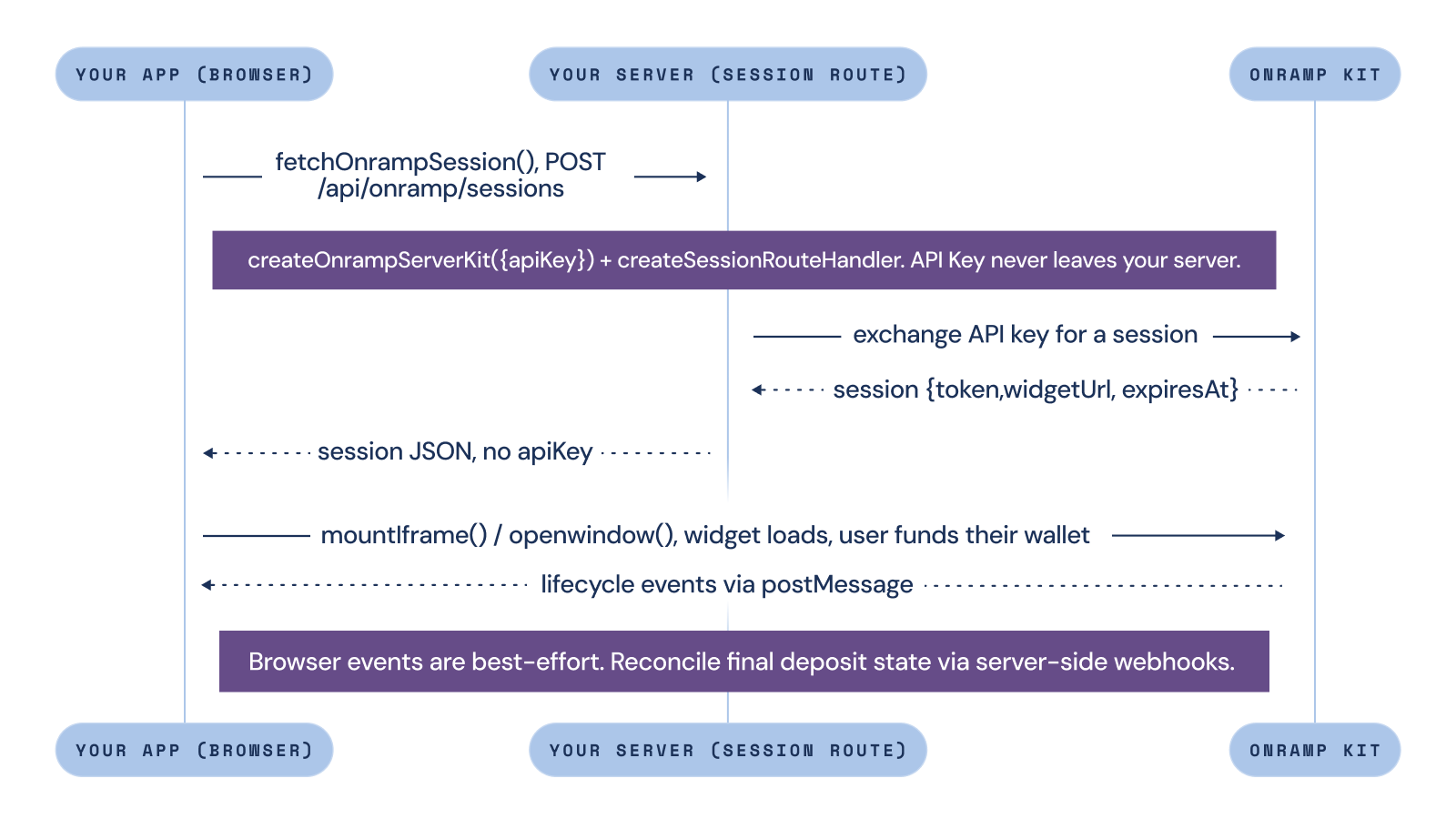
- Your server creates a short-lived onramp session for the user.
- Your frontend uses that session to launch the hosted Onramp Kit widget.
- Your app responds to lifecycle events so users know what is happening before, during, and after funding.
This split is important. Your API key is a long-lived credential, so it should stay on your backend. The browser only receives the short-lived session needed to launch the widget. For final package names, supported regions, payment methods, and the webhook setup, use the Onramp Kit developer documentation as the source of truth.
Step 1: Create a session route on your server
Start by adding a backend route that mints onramp sessions for authenticated users.
This route is the boundary between your app and the hosted funding flow. It should verify that the user is allowed to start the funding action, collect the destination wallet and optional funding details, create an onramp session, and return that session to the browser.
Before you create the route, generate an API key from the Circle Console. The API key authenticates Onramp Kit SDK access and it should stay on your backend. Store it as a server-side environment variable, such as ONRAMP_API_KEY, and do not expose it in client-side code. Paste it exactly as issued, including the prefix — the SDK sends the whole value as a bearer token.
Onramp Kit ships both as a standalone package and as part of the App Kit SDK. This guide uses the standalone package, so install @circle-fin/onramp-kit.
In a Next.js App Router project, the route can look like this:
import {
  createOnrampServerKit,
  createSessionRouteHandler,
} from "@circle-fin/onramp-kit/server";

const server = createOnrampServerKit({
  apiKey: process.env.ONRAMP_API_KEY!,
});

export const POST = createSessionRouteHandler(server, {
  authorize: async (request) => {
    const user = await getCurrentUser(request);
    return user != null;
  },
});
createSessionRouteHandlerserver.createSession() directly.
The session request should include the app user ID and destination wallet address. You can also pass optional values like amount, currency, email, metadata, and assets so the session can be connected back to your own app state. The assets option is worth knowing about: it scopes which token and chain pairs the widget offers, for example { tokens: ['USDC'] }.
Step 2: Launch the widget from your app
Once your backend returns a session, your frontend can launch the hosted Onramp Kit widget where the user expects to fund their account.
For most apps, that means starting with a funding action in the product: a balance screen, onboarding flow, checkout moment, trading account, wallet page, or any place where the user needs USDC before they can continue.
import { createOnrampKit, fetchOnrampSession } from "@circle-fin/onramp-kit";

const onramp = createOnrampKit();

const container = document.getElementById("onramp-root")!;
const body = {
  appUserId: "usr_1",
  destinationAddress: "0xYourDestinationWalletAddress",
};

const session = await fetchOnrampSession({
  url: "/api/onramp/sessions",
  body,
});

const widget = onramp.mountIframe({
  session,
  container,
  onDepositSettled: (envelope) => console.log("settled", envelope.payload),
  onInitializationError: (envelope) => {
    if (envelope.code === "INVALID_SESSION_TOKEN") {
      // re-mint the session and remount
    }
  },
});
This example uses onramp.mountIframe, which keeps the inline funding flow inside your app. For flows where a popup is a better fit, use onramp.openWindow. Popup mode should run directly from a user action, such as a click, so the browser does not block it.
The result is an embedded USDC funding flow that seamlessly sits alongside the rest of your product. Instead of sending users away to figure out how to fund their wallet, your app guides them through funding and brings them back to the action they were trying to complete.
Build for the full funding journey
Opening the widget is only one part of the funding experience. A good fiat onramp flow should help users understand what is happening before, during, and after they add funds. When the widget loads, the app should make it clear that the user is in a funding flow. When a deposit is submitted, the app should show a pending state. When funds settle, the app should bring the user back to the action they were trying to complete.
The less perfect paths matter too. A user may cancel the flow. A payment method may not be available. An identity verification step may require review. A payment provider issue may prevent the deposit from completing. These states should not feel like dead ends. Your app should give users a clear next step, whether that is retrying, choosing another method, returning later, or going back to the product flow.
Onramp Kit exposes lifecycle events so your app can respond to those moments in the UI:
INITIALIZATION_SUCCESS: the widget loaded and accepted the sessionINITIALIZATION_ERROR: the widget could not startDEPOSIT_SUBMITTED: the user submitted a depositDEPOSIT_SETTLED: the deposit settledDEPOSIT_NOT_COMPLETED: the flow ended without a completed deposit
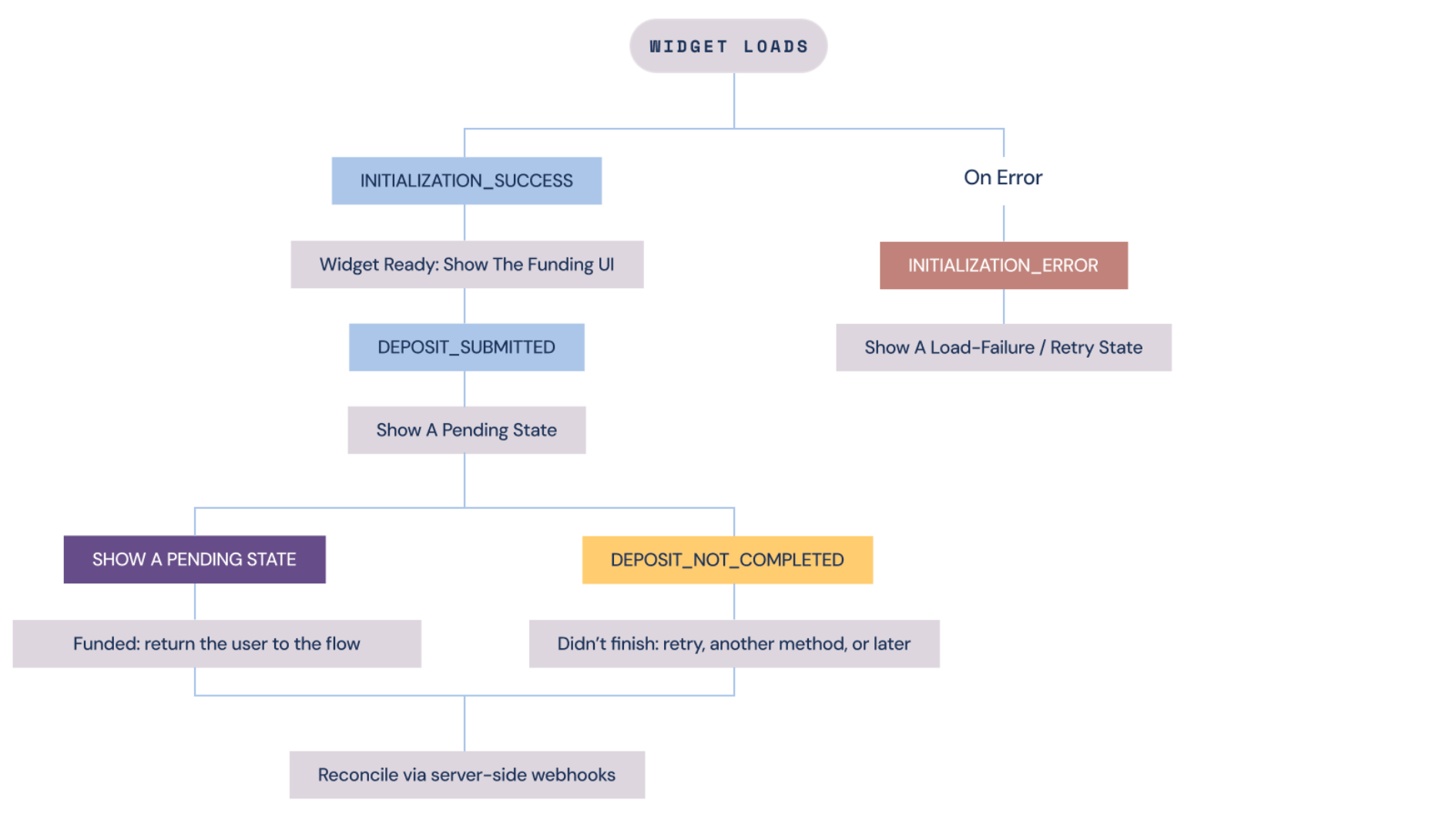
Use these browser events to guide the user experience, but reconcile final funding state from server-side webhooks. A user can close the browser before the final event is delivered, even if the deposit completes.
If you use iframe mode, make sure the widget has enough room to render and that your Content Security Policy allows the required Circle origins. If popup mode is a better fit, launch it directly from a user action so the browser does not block it.
For iframe mode, also set referrerDomain on your server kit to the bare hostname of the page that embeds the widget, for example portal.arc.io. It authorizes your page as a frame ancestor of the widget. It is a server-side construction option rather than a per-session parameter, so it can never be set from a client request, and the value takes a bare hostname only: no scheme, port, path, or wildcard, and the exact subdomain the page is served from.
The goal is not just to open an onramp. It is to make funding feel like part of your app.
Why in-app funding matters
Where funding lives shapes how much of your product people actually reach. When users have to leave your app to add USDC, you hand off your conversion and part of your support burden, but you lose people at every step out of and back into your app.
Keeping funding in your app changes that. Users stay in your product, the gap between "I want to add funds" and "I have USDC" shrinks, and they land back ready to use it. For wallets, trading apps, and anything built on USDC, that first funded moment is what unlocks everything after it.
And with Onramp Kit as part of App Kits, you get there without taking on a separate funding vendor. It's another capability in the same SDK you're already building with.
Start building with Onramp Kit
Bring USDC funding into your app. With Onramp Kit, developers can create a server-side session, launch a hosted funding widget, and guide users from funding action to funded wallet without stitching together the entire flow from scratch.
Explore the Onramp Kit developer documentation and start building your first embedded funding flow. To see the whole integration running end to end (the session route, the widget mount, and the lifecycle handlers), clone the Onramp Kit demo app.
Arc Onramp Kit is offered by Circle Technology Services, LLC ("CTS"), a software provider. CTS does not perform identity verification or payment processing services and is not responsible for the third-party services accessible through the Kit. Integrators are solely responsible for their own compliance. Developer Terms and applicable third-party terms apply; see Arc Onramp Terms for details. Onramp Kit is non-custodial and does not hold, control, or custody end-user funds or assets. Not reviewed or approved by any regulatory authority. Features may change at any time. Nothing herein constitutes a commitment, warranty, or guarantee; legal, regulatory, tax, or investment advice or an endorsement of any third-party provider. Offramp functionality is not yet available.
USDC is issued by regulated affiliates of Circle. See Circle’s list of regulatory authorizations.
Arc is an open L1 blockchain launched by Arc Network Services LLC ("Arc LLC") and operated by a permissioned validator set. Arc LLC provides software services only and does not offer regulated financial or advisory services. Arc has not been reviewed or approved by the New York State Department of Financial Services or any other regulatory authority.
The Arc network is provided "as is" and "as available." Use of Arc involves inherent risks associated with blockchain technology, including smart contract vulnerabilities, network disruptions, and the absence of recourse for transaction errors or losses. The ability to transact on Arc depends on the ability to obtain and use USDC to pay gas fees. Neither Arc LLC nor any permissioned validator is responsible for the content, accuracy, legality, or functionality of third-party applications, protocols, or services built on or integrated with Arc. You are solely responsible for features or services you provide to users, including obtaining any necessary licenses or approvals and otherwise complying with applicable laws.
All Arc features may be modified, delayed, or cancelled at any time without notice. Nothing herein constitutes a commitment, warranty, guarantee or legal, regulatory, tax, or investment advice.